
01
Describe the goal.
Continue a saved Your Sitekick conversation with context for the selected website. Explain what you want to improve.
SITEKICK CMS · AVAILABLE NOW
Give Sitekick a goal, inspect the proposed change, and decide what goes live.
Create your first site, then keep improving it. WordPress hosting. Full ownership. Export anytime.
CONVERSATION. COMPARISON. REVIEW.
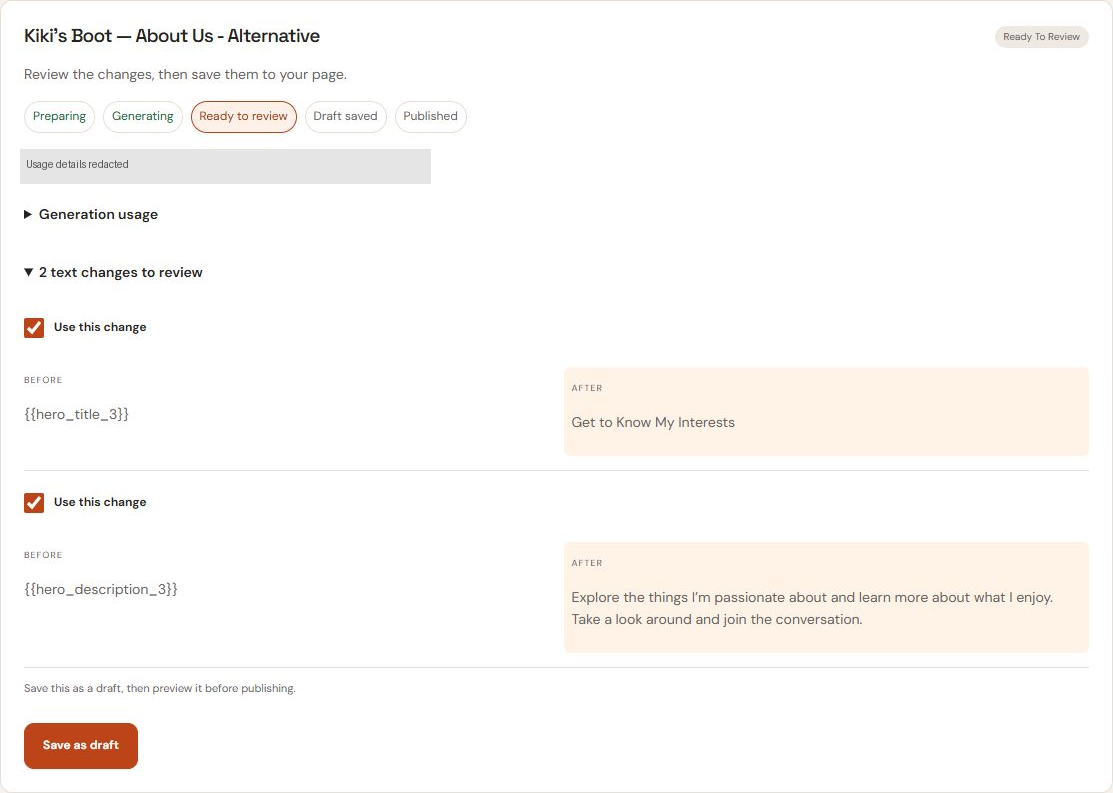
For supported conversational edits, compare proposed work before approving publication. Other CMS tools have their own controls.
Continue a saved Your Sitekick conversation with context for the selected website. Explain what you want to improve.
Compare the current page with the proposed alternative. A simplified structural preview is used when a rendered preview is unavailable.
Inspect the proposed changes in Activity. Review the saved draft and preview before deciding to publish.
Saving a draft and publishing are separate decisions. Proposed work leaves your live site unchanged until you approve publication.
ONE BUSINESS. A WHOLE WEBSITE.
Bring your services, story, and next step together. Plan the pages, explore a private preview, and make it your own before you publish.
EXAMPLE BUSINESS BRIEF
“I’m an independent consultant helping small business owners with strategy and operations. I offer strategy sessions, operations reviews, and ongoing advisory support. I want a warm, professional website that explains my services and invites the right clients to get in touch.”
Tell SiteKick about your business, your audience, and what your website should help them do.
Review a connected page plan, with a clear purpose for each page.
Explore the whole website privately before sharing it with customers.
Adjust the copy, images, and page layouts. Check your business details and contact information.
Choose to publish when you are ready. Creating or refining a draft does not publish it.
YOUR FIVE-PAGE PLAN
Select a page to explore its role and example content.
HOME · EXAMPLE CONTENT
NORTHSTAR ADVISORYNorthstar Advisory helps independent business owners turn competing priorities into a practical plan. Start with a conversation about where you are and what comes next.
Discuss your businessPositioning, service overview, and a clear invitation to get in touch.
Illustrative consulting website. Review all content and business details before publishing.
YOUR SITEKICK · IN THE WORDPRESS CMS
Return to a saved conversation for your selected website. Give Sitekick a goal, inspect its proposed work, and decide what goes live.
Your Sitekick keeps conversation history and approved decisions. Continue work with the selected website's project context instead of briefing each page in isolation.
Select page content and describe a supported text or layout change. Compare the current page with a proposed alternative, then review the saved draft in Activity. Some pages use a simplified structural preview when a rendered preview is unavailable.
Work from a whole-site plan through private preview and review. Planning, generation and publication are separate steps. Review the proposed changes and approve publication in your CMS session.
Planning and generation use credits. Available actions depend on your account, selected site and WordPress permissions. MCP requires a supported connection enabled for your account. Explore the conversation and MCP workflow.
THE PEOPLE BEHIND THE WEBSITES
The original Sitekick reports serving over 32,776 small businesses since 2022. These customers shared what they valued about that experience.
Sitekick is superb! The quickest way to get a professional landing page. It offers engaging copy-write, beautiful design and great structure. I struggled to put together different people with different skills for a convenient price. With Sitekick I have it all! It recommend me insightful written content that I would never think of. Time saver! I highly recommended it. Really easy to use!

Sitekick has helped me save time and money. I'm able to quickly build great-looking, conversion-focused landing pages with just a few clicks of the mouse!

Sitekick is the coolest thing is discovered this year. It takes the pain out of creating engaging, responsive and SEO optimized website pages for any business. No coding skills needed too, so i can just launch myself, and don't hire anyone to do it for me!

Sitekick has revolutionised the way I create landing pages! It's incredibly user-friendly and makes building professional, optimised pages a breeze. Highly recommend it to anyone looking for an easy way to make their website shine.

Sitekick has helped us leverage our time and creative thinking - giving us the freedom to focus on more important things. Sitekick is THE BEST product we've tested in a long time!

Sitekick has been a dream for me, it has amazing efficiency. I can use Sitekick easy for myself and even for my company. Not only we are able to create a new landing page in just minutes and deploy it with the push of a button, but we can optimize our existing pages as well!

Original customer reviews from the Sitekick AI CMS experience, preserved in full. These describe the CMS product experience, not results from Sitekick AI Studio. About Sitekick AI CMS ↗
More customer storiesLET’S MAKE IT CLEAR
SiteKick CMS is available now, with Lite, Basic, and Pro plans. Its WordPress workflow includes saved Your Sitekick conversations, proposed changes, preview and publication review. Actions depend on your account and site permissions; planning and generation use credits.
Powered by WordPress, with full ownership of your site, content, and assets. Export anytime.
Studio is being developed for custom websites, business applications and intelligent operations beyond the WordPress CMS. CMS conversation-led editing is available today, subject to account and site permissions. Studio is not launched; its interest list does not provide product access.